You are a smart phone user with unlimited data, text, and voice post-paid plan. However, you do not use your voice plan much. In fact, your voice plan usage has dropped so much that you will not even fully utilize the lowest tiered voice plan offered by your carrier. Your text usage is also dropping, thanks to applications such as Viber, Skype, and Blackberry messenger. Only your data usage is increasing. However, you are left wondering why do you still have to pay a heft sum for unlimited voice and text plans that you sparingly use?
Ok, ok, carriers (read AT&T and Verizon) do not offer unlimited data plans anymore, unless you were among those lucky customers who purchased smart phones from them a while back (or unless you are a Sprint customer). But wouldn't it be nice if you do not have to pay for voice and text plans per month that you sparingly use?
Sadly, there has been little innovation in cellular data, voice, and text plans which does not benefit the customer at all. The simplest pricing strategy is additive bundling. One must purchase a voice plan, before purchasing a data or text. And all of it from one carrier. Given the uptick in data usage, and given our phones are increasingly sophisticated computers, paying separately for data, voice, and text services, and forcing a user to purchase a voice plan before purchasing a data plan increasing does not make any sense. But what can be done?
Imagine the following plans.
Data only (post or prepaid)
Carriers only offer xG (where x stands for a 3 or 4) data plan, and provide their own free smart phone app for voice calling. This plan can be the cheapest option for users. Data service always works, so that parents can always text their kids. And kids do not pick the phone calls anyway from their parents. Voice calls may work, depending on the signal strength. Call it the teenager plan.
Data (post or prepaid) + voice calls (usage based)
Same as above with a prepaid voice plan. The carrier voice calling app dynamically shifts between xG data plan, WiFi, or a prepaid voice plan depending on the available signal and its strength. The user is only charged for the voice calls it makes. Call it the 35+ plan.
Data (post or prepaid) + voice plan (rollover or unlimited)
Same as above but with a rollover or unlimited voice plan. Call it the everything else, 20-35, or family talk plan.
Data (rollover) + voice plan (rollover)
Data and voice plans roll over from month to month.
Now imagine that you can purchase data + voice plans, but instead you can purchase data from one carrier and voice from another? Why is that useful? Imagine that when you want to upgrade your phone, both your data and voice carriers offer you a phone upgrade option. Wouldn't that be cool?
Such a plan can potentially become a traveler's best friend. For example, when you travel, why do you have to worry about purchasing a separate SIM card for phone and carrying two phones? Just purchase or add credit to a local voice plan app for your smart phone and bingo!
But where is this innovation going to come from? Do not expect to come it from carriers.
The person who may have been able to pull it off in the very near future -- Steve Jobs -- is now dead. Android is all about increasing its installed base, so it will be least likely to upset carriers. Windows phone is too young to force carriers to innovatively price their voice plans.
Some innovation may require regulatory intervention without which one may never be able to purchase a data plan from one carrier and voice plan from other.
Or, perhaps, the innovation in pricing may come from an underdog carrier. Who knows?
Monday, November 07, 2011
Saturday, July 16, 2011
Gift registries, groups, and partial payments
I recently made an online purchase for a friend's gift registry on amazon.com and was left wondering about the room for innovation in this space. Although I purchased the gift, but I really wanted to contribute money towards a more expensive item in the gift registry because it is something that my friend will really like. However, the item was too expensive for a single purchase. Unfortunately, there do not seems to be a way to partially pay (or contribute) towards the price of a more expensive gift on Amazon's gift registries. The old fashioned way of doing it is by giving cash as a gift. The online registry creator can also select gift cards of different values which people can purchase. Then there are cash registries where people can 'gift' money for a baby's college fund or honey moon fund, which is just another play on the gift idea cards or vice versa.
But can we do better? Can we leverage the idea of groups, crowd sourcing, and partial payments to innovate in gift registries?
What if there was a Groupon-like way to keep track of partial payments towards gifts? For example, the creator of gift registry can set a limit like, 'if 50% of the costs for a gift are paid by my friends, I will purchase the item'. The person purchasing the gift can have the option of purchasing the gift, contributing towards partial payment of a gift, or simply paying cash. The purchaser can limit the use of cash, i.e., use it only towards gifts etc.
But can we do better? Can we leverage the idea of groups, crowd sourcing, and partial payments to innovate in gift registries?
What if there was a Groupon-like way to keep track of partial payments towards gifts? For example, the creator of gift registry can set a limit like, 'if 50% of the costs for a gift are paid by my friends, I will purchase the item'. The person purchasing the gift can have the option of purchasing the gift, contributing towards partial payment of a gift, or simply paying cash. The purchaser can limit the use of cash, i.e., use it only towards gifts etc.
Sunday, July 03, 2011
Link plagiarism, Google+, and Facebook
Have you ever seen the link posted by you being re-posted by one of your friends without a 'via', as-if indicating that they were the first to found the link? I call this link plagiarism. Basically, you see a link posted by your friend, and you repost it on your profile without any attribution. Admittedly, I may also be guilty of this -:)
Now, Facebook groups together the same link being posted by your friends and also shows the time they were posted. So you can easily track when did the story broke among your friends and who was the first to report it. I want Google+ to have the same ability. It will be cool to develop a tool that scans one's friends profiles and see who is the habitual plagiarist :)
Now, Facebook groups together the same link being posted by your friends and also shows the time they were posted. So you can easily track when did the story broke among your friends and who was the first to report it. I want Google+ to have the same ability. It will be cool to develop a tool that scans one's friends profiles and see who is the habitual plagiarist :)
Friend Recommendation in Google+

When I clicked on 'Find and Invite' in Google+, the results recommended me Larry Page and Sergey Brin among the people I know. Interestingly, the page recommended Larry ahead of Sergey by seven people. (The number of people between Larry and Sergey was higher initially, but it decreased to seven by the time I was writing this post as I added some people as 'Friends'). Obviously, I was intrigued! I have never met any of them before. Moreover, Facebook has never recommended Mark Zuckerberg as a friend to me. So what is going on?
On a bit of digging, I found that one of my Google+ friends has them in their friend's list. So that explains why Google+ is recommending them as the people I know. But why would it rank Larry ahead of Sergey for me? -:) May be, because at this time, there are approximately 12,000 people who have Larry in their circles, but only ~9,000 people who have Sergey in their circles. Surely, Larry is more popular than Sergey :)
But does Google+ only recommends people to me who are friends with my existing friends? The answer is no. Not surprisingly, it seems to use multiple strategies. One strategy is obviously, 'Friends of Friends' for recommendation. That seems to be the easiest approach. The other strategy seems to be a 'Gmail scan'. Without scanning my Gmail, it will never have recommended me people who are not even on Google+. This is an interesting strategy because there are several options on how to implement it. One option is that Google+ scans my inbox for conversations. That is the easiest option. The other option is to scan my inbox for emails from people that are on the same listserv as I am. Finally, the third strategy seems to be a bit of mystery. I will call this the 'Other' strategy. Google+ recommended me people that are not 'Friends of Friends', and with whom I have not exchanged an email and I think that we are not in the same listserv.
Wednesday, April 06, 2011
vSphere snapshot deletion 95% hang
Recently, I was trying to delete snapshots on ESXi and ran into some problems. When I deleted the snapshot, vSphere snapshot removal was stuck on 95%. I found some nice articles from VMware on how to resolve this, such as (1), (2), (3).
I was starting to get errors such as: "unable to connect to the mks: error connecting to /bin/vmx process" and the VM will not start.
I decided to delete another VM on the same PM in order to free up space for the VM stuck with 95% snapshot completion. That helped resolve the problem.
I was starting to get errors such as: "unable to connect to the mks: error connecting to /bin/vmx process" and the VM will not start.
I decided to delete another VM on the same PM in order to free up space for the VM stuck with 95% snapshot completion. That helped resolve the problem.
Saturday, March 19, 2011
datemyschool.com -- an analysis
Recently, a friend of mine pointed me to datemyschool.com, a website that facilitates meeting and dating people from different schools within a person's enrolled university and some other universities. The main idea is that a person signs up with their university email address, and indicates their preference in a person of opposite sex, same sex, or both at the sign up time. (The preference can also be changed later through website settings.) Once the user logs in, he or she can view the profiles of other people from the different schools within the same university, or other universities. For example, people from Columbia, NYU, FIT, Princeton, and Yale can view profiles of each other. (Initially, the site was restricted to Columbia, NYU, and FIT).
The website is very interesting from the perspective of a social science researcher as it provides a useful window into the relationship dynamics of students in different schools and universities, very easily.
I computed some statistics on the number of people looking for a relationship or friendship within different schools at Columbia and NYU. There statistics were computed on March 19th and 20th, 2011. The results are shown in the bar graphs below. Each graph displays the number of females and males according to a certain metric. The number of females and males are computed using the 'Calculate' button in the 'Search' page of datemyschool.com . The number of males include those who are looking for females or looking for both males and females, and vice versa. The website does not allow restricting search to people who are only looking for friendship or relationship. The website also does not allow searching for people who are alumni or are currently enrolled.
Most of the results may not be considered surprising, but are definitely interesting.
The salient features of these statistics are:

Figure 1: Number of females and males in Columbia and NYU with a profile.

Figure 2: Number of females and males in Columbia and NYU that have a picture with a profile. Observe that only 50% of the people upload a profile picture.

Figure 3: Number of Columbia and NYU students with a profile pic, sorted according to their religion preference. It is optional to specify any of the religion choices as shown in the figure above.

Figure 4: Number of Columbia and NYU students with a profile pic, sorted according to their ethnicity preference. It is optional to specify any of the ethnicity choices as shown in the figure above.
Observe from Figure 3 and 4 that of all the Columbia and NYU students with a profile pic, only 52%-63% specify their religious preference, while more than 90% specify their ethnicity preference.

Figure 5: Of the 311 and 305 Columbia female and male students who have a profile pic and specify their religious preference, the above figure shows the number of people who have selected a particular category.

Figure 6: Of the 560 and 582 Columbia female and male students who have a profile pic and specify their ethnicity preference, the above figure shows the number of people who have selected a particular category.

Figure 7: Age distribution of females and males at Columbia, including the ones with a profile picture. The total numbers do not add up to the numbers in Figure 1 and 2, but I am not sure of the reason.

Figure 8: The total number of male and female students in different Columbia schools. The figure also shows the number of males and females who have uploaded a picture.
(The views expressed in this article are my own and do not reflect the views of my employers)
The website is very interesting from the perspective of a social science researcher as it provides a useful window into the relationship dynamics of students in different schools and universities, very easily.
I computed some statistics on the number of people looking for a relationship or friendship within different schools at Columbia and NYU. There statistics were computed on March 19th and 20th, 2011. The results are shown in the bar graphs below. Each graph displays the number of females and males according to a certain metric. The number of females and males are computed using the 'Calculate' button in the 'Search' page of datemyschool.com . The number of males include those who are looking for females or looking for both males and females, and vice versa. The website does not allow restricting search to people who are only looking for friendship or relationship. The website also does not allow searching for people who are alumni or are currently enrolled.
Most of the results may not be considered surprising, but are definitely interesting.
The salient features of these statistics are:
- There are approximately 3800 users in both Columbia and NYU (Figure 1). The site is more popular at Columbia than NYU.
- The ratio of males and females within Columbia and NYU is comparable, but the ratio varies greatly with different schools in each university.
- The number of people with a profile picture is approximately 50-60% of the total population (Figure 2). These people may be considered active users.
- People with a profile picture almost always specify their ethnicity (Figure 4).
- However, only 50-60% of people with a profile picture specify their religious preference, even though religious preference contains options such as 'Other' (Figure 3).
- Graduate students are more likely to upload a picture than undergraduate students. Approximately, one third on undergraduates upload their picture instead of 50% for graduate students.
- Business, engineering, and GSAS have more males than females, whereas teachers college, social work, and medical center have the opposite trend. The distribution of males and females in these schools confirms the commonly held stereotypes. For example, there are many engineering make students looking for females (155 vs 16).
- More men declare themselves to be atheist than woman (54 vs 29) where as more woman declare themselves to be spiritual than men (63 vs 48)
- People with agnostic, atheist, or spiritual beliefs approximately comprise 50% of the total who indicate their religious preference.
- There are more older males than females.

Figure 1: Number of females and males in Columbia and NYU with a profile.

Figure 2: Number of females and males in Columbia and NYU that have a picture with a profile. Observe that only 50% of the people upload a profile picture.

Figure 3: Number of Columbia and NYU students with a profile pic, sorted according to their religion preference. It is optional to specify any of the religion choices as shown in the figure above.

Figure 4: Number of Columbia and NYU students with a profile pic, sorted according to their ethnicity preference. It is optional to specify any of the ethnicity choices as shown in the figure above.
Observe from Figure 3 and 4 that of all the Columbia and NYU students with a profile pic, only 52%-63% specify their religious preference, while more than 90% specify their ethnicity preference.

Figure 5: Of the 311 and 305 Columbia female and male students who have a profile pic and specify their religious preference, the above figure shows the number of people who have selected a particular category.

Figure 6: Of the 560 and 582 Columbia female and male students who have a profile pic and specify their ethnicity preference, the above figure shows the number of people who have selected a particular category.

Figure 7: Age distribution of females and males at Columbia, including the ones with a profile picture. The total numbers do not add up to the numbers in Figure 1 and 2, but I am not sure of the reason.

Figure 8: The total number of male and female students in different Columbia schools. The figure also shows the number of males and females who have uploaded a picture.
(The views expressed in this article are my own and do not reflect the views of my employers)
Saturday, January 15, 2011
Connecting iPad with EAP-TLS security
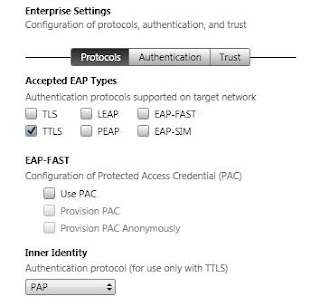
Recently, a friend of mine asked me to connect his iPad to a network that requires EAP-TTLS security. By default, iPad does not have EAP-TTLS profile installed. To install this profile on iPad, I downloaded the iPhone configuration utility . Then, I setup the configuration by selecting the EAP profile and selecting TTLS checkbox. Then, I selected the PAP security from the inner security dropdown box since my friend's network requires it. Here is a snapshot.
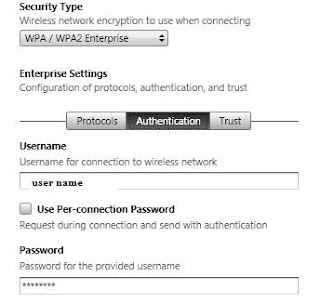
Then, I selected the WPA / WPA2 Enterprise. entered the name of the network (not shown below) and entered the user name and password.
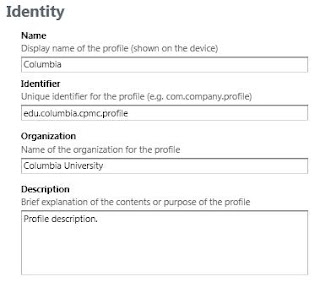
Enter your profile name and identity as shown below. The example is for Columbia medical center.
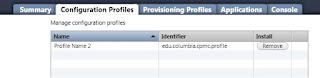
Then, I installed the profile on iPad. The figure below shows the profile that has been installed.
Your should now be connected to your network.


Then, I selected the WPA / WPA2 Enterprise. entered the name of the network (not shown below) and entered the user name and password.

Enter your profile name and identity as shown below. The example is for Columbia medical center.

Then, I installed the profile on iPad. The figure below shows the profile that has been installed.

Your should now be connected to your network.
Monday, October 04, 2010
Skype-Facebook partnership: A response to Google (Talk+email)?
http://www.cnn.com/2010/TECH/social.media/10/04/facebook.skype.partnership/index.html
Social media meets real-time communication? Facebook needs Skype because they do not have a real-time communication network. Skype needs Facebook because they do not have access to their user's email graph (like Google). Its really Facebook and Skype's answer to Google's growing threat to their businesses.
Social media meets real-time communication? Facebook needs Skype because they do not have a real-time communication network. Skype needs Facebook because they do not have access to their user's email graph (like Google). Its really Facebook and Skype's answer to Google's growing threat to their businesses.
Friday, September 17, 2010
Using tc to regulate downlink speed
tc qdisc add dev eth0 handle ffff: ingress
tc filter add dev eth0 parent ffff: protocol ip prio 50 u32 match ip src 0.0.0.0/0 police rate
100kbit burst 10k drop flowid :1
The second command limits the download rate to 100kbit by dropping packets. Since we do not want to drop too many packets, we setup a burst size size of 10k.
See this link for more details.
http://lartc.org/howto/lartc.cookbook.ultimate-tc.html
tc filter add dev eth0 parent ffff: protocol ip prio 50 u32 match ip src 0.0.0.0/0 police rate
100kbit burst 10k drop flowid :1
The second command limits the download rate to 100kbit by dropping packets. Since we do not want to drop too many packets, we setup a burst size size of 10k.
See this link for more details.
http://lartc.org/howto/lartc.cookbook.ultimate-tc.html
Using tc to regulate uplink speed
Here is a nice script that I found:
----------------
#!/bin/bash
#
# tc uses the following units when passed as a parameter.
# kbps: Kilobytes per second
# mbps: Megabytes per second
# kbit: Kilobits per second
# mbit: Megabits per second
# bps: Bytes per second
# Amounts of data can be specified in:
# kb or k: Kilobytes
# mb or m: Megabytes
# mbit: Megabits
# kbit: Kilobits
# To get the byte figure from bits, divide the number by 8 bit
#
#
#Name of the traffic control command.
TC=/sbin/tc
# The network interface we're planning on limiting bandwidth.
IF=eth0 # Interface
# Download limit (in mega bits)
DNLD=1mbit # DOWNLOAD Limit
# Upload limit (in mega bits)
UPLD=1mbit # UPLOAD Limit
# IP address of the machine we are controlling
IP=128.59.9.113 # Host IP
# Filter options for limiting the intended interface.
U32="$TC filter add dev $IF protocol ip parent 1:0 prio 1 u32"
start() {
# We'll use Hierarchical Token Bucket (HTB) to shape bandwidth.
# For detailed configuration options, please consult Linux man
# page.
$TC qdisc add dev $IF root handle 1: htb default 30
$TC class add dev $IF parent 1: classid 1:1 htb rate $DNLD
$TC class add dev $IF parent 1: classid 1:2 htb rate $UPLD
$U32 match ip dst $IP/32 flowid 1:1
$U32 match ip src $IP/32 flowid 1:2
# The first line creates the root qdisc, and the next two lines
# create two child qdisc that are to be used to shape download
# and upload bandwidth.
#
# The 4th and 5th line creates the filter to match the interface.
# The 'dst' IP address is used to limit download speed, and the
# 'src' IP address is used to limit upload speed.
}
stop() {
# Stop the bandwidth shaping.
$TC qdisc del dev $IF root
}
restart() {
# Self-explanatory.
stop
sleep 1
start
}
show() {
# Display status of traffic control status.
$TC -s qdisc ls dev $IF
}
case "$1" in
start)
echo -n "Starting bandwidth shaping: "
start
echo "done"
;;
stop)
echo -n "Stopping bandwidth shaping: "
stop
echo "done"
;;
restart)
echo -n "Restarting bandwidth shaping: "
restart
echo "done"
;;
show)
echo "Bandwidth shaping status for $IF:"
show
echo ""
;;
*)
pwd=$(pwd)
echo "Usage: tc.bash {start|stop|restart|show}"
;;
esac exit 0
----------------
#!/bin/bash
#
# tc uses the following units when passed as a parameter.
# kbps: Kilobytes per second
# mbps: Megabytes per second
# kbit: Kilobits per second
# mbit: Megabits per second
# bps: Bytes per second
# Amounts of data can be specified in:
# kb or k: Kilobytes
# mb or m: Megabytes
# mbit: Megabits
# kbit: Kilobits
# To get the byte figure from bits, divide the number by 8 bit
#
#
#Name of the traffic control command.
TC=/sbin/tc
# The network interface we're planning on limiting bandwidth.
IF=eth0 # Interface
# Download limit (in mega bits)
DNLD=1mbit # DOWNLOAD Limit
# Upload limit (in mega bits)
UPLD=1mbit # UPLOAD Limit
# IP address of the machine we are controlling
IP=128.59.9.113 # Host IP
# Filter options for limiting the intended interface.
U32="$TC filter add dev $IF protocol ip parent 1:0 prio 1 u32"
start() {
# We'll use Hierarchical Token Bucket (HTB) to shape bandwidth.
# For detailed configuration options, please consult Linux man
# page.
$TC qdisc add dev $IF root handle 1: htb default 30
$TC class add dev $IF parent 1: classid 1:1 htb rate $DNLD
$TC class add dev $IF parent 1: classid 1:2 htb rate $UPLD
$U32 match ip dst $IP/32 flowid 1:1
$U32 match ip src $IP/32 flowid 1:2
# The first line creates the root qdisc, and the next two lines
# create two child qdisc that are to be used to shape download
# and upload bandwidth.
#
# The 4th and 5th line creates the filter to match the interface.
# The 'dst' IP address is used to limit download speed, and the
# 'src' IP address is used to limit upload speed.
}
stop() {
# Stop the bandwidth shaping.
$TC qdisc del dev $IF root
}
restart() {
# Self-explanatory.
stop
sleep 1
start
}
show() {
# Display status of traffic control status.
$TC -s qdisc ls dev $IF
}
case "$1" in
start)
echo -n "Starting bandwidth shaping: "
start
echo "done"
;;
stop)
echo -n "Stopping bandwidth shaping: "
stop
echo "done"
;;
restart)
echo -n "Restarting bandwidth shaping: "
restart
echo "done"
;;
show)
echo "Bandwidth shaping status for $IF:"
show
echo ""
;;
*)
pwd=$(pwd)
echo "Usage: tc.bash {start|stop|restart|show}"
;;
esac exit 0
Thursday, August 05, 2010
Limiting bandwidth per process in Linux
A friend of mine recently asked me how to limit bandwidth per process in Linux. Here are the steps for accomplishing this using iptables and tc. The idea is to create a traffic class, specify the class priority and the bit-rate etc, tell the traffic class that packets with a handle [x] should be handled by this class, and assign packets a handle using iptables. iptables allows to assign a handle using gid or pid. Here are the commands. These commands do not limit incoming traffic so, one has to set iptables for INPUT accordingly.
#setting the root queuing class (can be ignored)
tc qdisc add dev eth0 root handle 1: htb default 15
#specify the class with priorty 1. The class id is 1:1
tc class add dev eth0 parent 1: classid 1:1 htb rate 10kbit ceil 10kbit prio 1
#specify the filter. so packets with handle '10' go into the class 1:1
tc filter add dev eth0 parent 1:0 protocol ip prio 1 handle 10 fw classid 1:1
#now give the packets a handle of 10
iptables -t mangle -A OUTPUT -m owner --gid-owner [gid] -j MARK --set-mark 0xa
A good description of of traffic shaping in Linux can be found here.
http://lartc.org/howto/lartc.cookbook.fullnat.intro.html
#setting the root queuing class (can be ignored)
tc qdisc add dev eth0 root handle 1: htb default 15
#specify the class with priorty 1. The class id is 1:1
tc class add dev eth0 parent 1: classid 1:1 htb rate 10kbit ceil 10kbit prio 1
#specify the filter. so packets with handle '10' go into the class 1:1
tc filter add dev eth0 parent 1:0 protocol ip prio 1 handle 10 fw classid 1:1
#now give the packets a handle of 10
iptables -t mangle -A OUTPUT -m owner --gid-owner [gid] -j MARK --set-mark 0xa
A good description of of traffic shaping in Linux can be found here.
http://lartc.org/howto/lartc.cookbook.fullnat.intro.html
Monday, May 31, 2010
Matlab and embedding fonts in pdf
I typically create figures using Matlab and incorporate the eps files in my pdf file. Matlab print function does not correctly embed the fonts in the pdf file. However, there are many ways of generating eps files in Matlab with correctly embedded fonts:
http://www.mathworks.com/matlabcentral/newsreader/view_thread/172388
Here is another link that I found useful:
http://do.whileloop.org/soft/tricks/pdflatex-fonts.php
http://www.mathworks.com/matlabcentral/newsreader/view_thread/172388
Here is another link that I found useful:
http://do.whileloop.org/soft/tricks/pdflatex-fonts.php
Monday, November 13, 2006
Apache README
The browser does not show the file with the name "README". One has to modify the Apache variables to ensure that such a file is displayed in the browser.
Friday, October 07, 2005
Islamabad Earthquake Pics


Earth quake in islamabad. Margalla Towers located in the heart of Islamabad collapsed.
Monday, July 26, 2004
Google is Down?
Google search doest seem to br working as of 1:50pm EST, July 26, 2004. news.google.com and blogger are working though!!!
Tuesday, July 13, 2004
Blogger doest have Search!!!
A month back I created this blog. Blogger.com, as we know is powered and run by Google, the internet search company.
After writing my first blog about 'GMail', I wanted to search other blogs related to it. Naturally I tried to find a 'Search button' on the page. Unable to find it I shoot an email to blogger support. Only surprised to find out that blogger.com has no search capability as yet!!!
After writing my first blog about 'GMail', I wanted to search other blogs related to it. Naturally I tried to find a 'Search button' on the page. Unable to find it I shoot an email to blogger support. Only surprised to find out that blogger.com has no search capability as yet!!!
Wednesday, June 30, 2004
GMail Related Websites
1) GMail Swap. Interesting site if you want to get a GMail INVITE
www.gmailswap.com
2) GMail is too creepy. Those annoyed with GMail :)
http://gmail-is-too-creepy.com/
3) GMail for Troops
http://www.gmail4troops.com/
4) GMail Mail filters. Spam this account (prattboy@gmail.com)
http://gmail.prattboy.net/
5) GMail Gems. Ways to open, close, write new mails
http://gmailgems.blogspot.com/
6) gmail.net (nice way to get a site name0
http://www.gmail.net/
7) What's this Gmail?
http://www.short-media.com/review.php?r=246
8) Google Weblog (not a gmail posting directly)
http://google.blogspace.com/
www.gmailswap.com
2) GMail is too creepy. Those annoyed with GMail :)
http://gmail-is-too-creepy.com/
3) GMail for Troops
http://www.gmail4troops.com/
4) GMail Mail filters. Spam this account (prattboy@gmail.com)
http://gmail.prattboy.net/
5) GMail Gems. Ways to open, close, write new mails
http://gmailgems.blogspot.com/
6) gmail.net (nice way to get a site name0
http://www.gmail.net/
7) What's this Gmail?
http://www.short-media.com/review.php?r=246
8) Google Weblog (not a gmail posting directly)
http://google.blogspace.com/
Thursday, June 24, 2004
GMail INVITE frequency
I got: 5+5+6 last week and 6 this week so far
I have now 39 INVITES so far
If you dont use the quota of all your invites, then you dont get more INVITES. At least this seems to be the case with me
I have now 39 INVITES so far
If you dont use the quota of all your invites, then you dont get more INVITES. At least this seems to be the case with me
Wednesday, June 16, 2004
GMail INVITES
I started using GMail on April 17, 2004. Since then upto today (June 16, 2004) I have got 16+1 invitations so far. Their break down is as:
2: after two weeks
1: On mothers day
3+3: last week
3+5: this week so far.
GMail has increased its quota of invites to 5 now.
2: after two weeks
1: On mothers day
3+3: last week
3+5: this week so far.
GMail has increased its quota of invites to 5 now.
Tuesday, June 15, 2004
Yahoo Mail Vs GMail
Is Yahoo Really 100MB?
------------------------------------
The site says so. But if you log in using your old yahoo account, it
still says that you are using xx% out of 4MB (true as of June 15, 2004
9:40AM +5GMT :) A friend reported that this was not the case with him
But if you create a new account, the amount of total storage it
displays is 100MB. Still updating their records :)
I created a new Yahoo account of 100 MB and sent 2MB files thrice to my new and old yahoo accounts. My old yahoo cannot accept the third file as its quota of 4MB exceeded. My new yahoo account accepted it :)
Need a GMail Account
---------------------------------
check out gmailswap.com
also note that if you log in blogger.com (another google website) you
may get a gmail account
GMail Accounts for Sale
------------------------------------
GMail accounts are also available for sale on eBay:)
http://search.ebay.com/gmail_W0QQsokeywordredirectZ1QQfromZR8
The price crashed from 60$ to 0.25$ now
GMail Spam Protection (interesting article):
--------------------------------------------------------------
http://slashdot.org/articles/04/06/14/1121209.shtml?tid=111&tid=126&tid=217&tid=95
Spam Filter Comparison?
-------------------------------------
Any security geek out there who can compare the spam filters of GMail
and Yahoo? Could be an interesting project for MS
Where is Microsoft?
----------------------------
As usual always late. Any comments:) Still sleeping in redmond I
guess. Perhaps Gates will prefer to buy google :) HOTMAIL IS DEAD
GMail Spoof
-------------------
http://www.thespoof.com/news/spoof.cfm?headline=s3i4535
Article on Google Business Model / Risks / Valuation
-----------------------------------------------------------------------------
http://www.business2.com/b2/web/articles/1,17863,649686,00.html
http://www.traffick.com/article.asp?aID=163
------------------------------------
The site says so. But if you log in using your old yahoo account, it
still says that you are using xx% out of 4MB (true as of June 15, 2004
9:40AM +5GMT :) A friend reported that this was not the case with him
But if you create a new account, the amount of total storage it
displays is 100MB. Still updating their records :)
I created a new Yahoo account of 100 MB and sent 2MB files thrice to my new and old yahoo accounts. My old yahoo cannot accept the third file as its quota of 4MB exceeded. My new yahoo account accepted it :)
Need a GMail Account
---------------------------------
check out gmailswap.com
also note that if you log in blogger.com (another google website) you
may get a gmail account
GMail Accounts for Sale
------------------------------------
GMail accounts are also available for sale on eBay:)
http://search.ebay.com/gmail_W0QQsokeywordredirectZ1QQfromZR8
The price crashed from 60$ to 0.25$ now
GMail Spam Protection (interesting article):
--------------------------------------------------------------
http://slashdot.org/articles/04/06/14/1121209.shtml?tid=111&tid=126&tid=217&tid=95
Spam Filter Comparison?
-------------------------------------
Any security geek out there who can compare the spam filters of GMail
and Yahoo? Could be an interesting project for MS
Where is Microsoft?
----------------------------
As usual always late. Any comments:) Still sleeping in redmond I
guess. Perhaps Gates will prefer to buy google :) HOTMAIL IS DEAD
GMail Spoof
-------------------
http://www.thespoof.com/news/spoof.cfm?headline=s3i4535
Article on Google Business Model / Risks / Valuation
-----------------------------------------------------------------------------
http://www.business2.com/b2/web/articles/1,17863,649686,00.html
http://www.traffick.com/article.asp?aID=163
Subscribe to:
Posts (Atom)